

Firefox Download Manager Integration
V. 1.5.6.13 Download Anything, Replay Anytime.
If you find any bug or you'd like an enhancement, before reporting here or here, please check if it's fixed in latest development build. Many thanks!
Main good news are:
- Fixed breakage due to getter/setter definition changes in latest Firefox nightlies.
- "[Middle Button Drag Down] gesture starts FlashGot downloads" checkbox in FlashGot Options window.
- Bug fix: Link Chooser not properly honoring its "Choose all items by default" checkbox (thanks BaptX for reporting).
- Fixed built-in download manager not working on SeaMonkey 33 and above (thanks therube for report).
- Fixed POST data being sent with preamble headers no recent browser versions (thanks MoSal for report and flashgot.user for patch).
- New custom download manager argument placeholders, courtesy of flashgot.user's patch: "RAWPOST" sends the raw POST upload data including its headers; "HEADERS" sends just the POST data headers.
- Added Folx 4 and 3 support as "Folx" (legacy support is kept as "Folx 2")
- Support for 5 additional terminal emulators on Linux (konsole, lxterminal, urxvt, rxvt, xfce4-terminal, thanks Mathias Bauer for patch)
- Fixed JDownloader 2 detection issue (thanks user).
- Updated Youtube support (thanks user).
- Graceful handling of invalid referrer URLs.
- Support for full encryption on https://flashgot.net/
- Terminal windows attached to Linux/OS X download managers are now paused on completion with "Press [ENTER] to exit...", unless you set the flashgot.term.autoClose about:config preference to a non-negative integer value, meaning the number of seconds to be waited before automatically closing.
- Several FlashGot Media capturing improvements (thanks user for patches).
- Customizable terminal/launcher for Linux/Mac OS X download managers: if a "flashgot-term" script is found in $PATH it gets passed a "FlashGot (number of links)" string as its first argument (to be used as the terminal title), followed by the actual executable with arguments.
- Updated fr & pl localizations (thanks Jack Black and Teo)
- More compatible and complete generic URL parameter redirector (grabs the "real" final URLs from redirects and trackers).
- Addresses of media content captured by FlashGot Media can be copied to the clipboard by right-clicking their menu entries (thanks GµårÐïåñ for RFE).
- Updated dfiles.eu (FKA depositfiles.com) preprocessing for batch direct link premium downloads (similar FlashGot-supported preprocessed file sharing services are fileserve.com, filesonic.com, hotfile.com, megaupload.com, netload.in, rapidshare.com, uploading.com, uploaded.to, ul.to, zshare.com).
- FlashGot Media toolbar icon placement can be customized also while no media is playing.
- Added recent folders autocompletion support to built-in save path chooser; just focus the text field or type in it to have up to 10 recently used download paths to be looked up (thanks Scott Merrill for RFE)
- Added suggested file name support for links diverted from the "Save as" dialog.
- Added private mode support when calling built-in download manager.
- Further accuracy improvements in the Middle mouse button + drag south gesture, which triggers either FlashGot Link or FlashGot Selection, depending on the context (can be disabled by setting the flashgot.gesture about:config preference to false).
- Improved oron.com preprocessing for batch direct link downloads (similar FlashGot-supported preprocessed file sharing services are fileserve.com, filesonic.com, hotfile.com, megaupload.com, netload.in, rapidshare.com, uploading.com, uploaded.to, ul.to, zshare.com).
- Batch download support for linksafe.me (other already supported link protection/redirection services are chooselinks.com, re-links.com, protectlinks.com, rapidsafe.net, relink.us, rsmonkey.com, hideurl.biz, ftp2share.net, rapidbolt.com, linkbank.eu, linkbucks.com, rsprotect.com
- Updated and enhanced batch download support for relink.us (other already supported link protection/redirection services are chooselinks.com, re-links.com, protectlinks.com, rapidsafe.net, rsmonkey.com, hideurl.biz, ftp2share.net, rapidbolt.com, linkbank.eu, linkbucks.com, rsprotect.com (WARNING: Feb 15 2009, the rsprotect.com web site is infected, don't open without NoScript enabled), link-protector.com, stealth.to and lix.in, urlcash.net).
- Download Studio support (trial download here).
- Improved FlashGot Options|FlashGot Media panel, to choose a distinct download manager for streaming media capture. Firefox's built-in download manager is recommended because it uses browser's cache whenever possible and supports name guessing, and it's set as the default for FlashGot Media on new installatios.
- Windows visual download managers are fully supported on Linux and Mac OS X through Wine and Darwine (tested with FlashGet and Orbit Downloader on Ubuntu 8.0.4). You can enable or disable Wine support by setting the flashgot.useWine about:config preference to true or false.
More in the changelog...
FlashGot, the best Firefox download manager integration, has been honored in the May 2006 issue of PC World,
the most widely-read computer or business magazine, as one of the "101 Fabulous Freebies"
"Each download or service on the list impressed the editors with its functionality and usability,”
said Harry McCracken, VP/editor in chief of PC World. "These are some of the most well-crafted services available – congratulations to FlashGot!"
So...
Are you tired of "saving as..." one by one all those movies, music files, pictures, programs and so on?
Are you sick of getting them sooo slowly?
Are you afraid of losing them in the middle of download if you get disconnected or close your browser,
being forced to repeat all that tedious work?
Well, you need a
download manager...
But... Aaaargh!!! my download manager doesn't work with
Firefox! They say it does, but where is my Download All menu?
How can I handle the tons of mp3, mpeg, jpg files that I want to download?
Well, you definitely need...
FlashGot!


FlashGot is the free add-on for
Firefox and
Thunderbird,
meant to handle single and massive ("all" and
"selection") downloads with several external Download Managers.
- for Windows (BitComet, Download Accelerator Plus, DownloadStudio, FlareGet, FlashGet, Free Download Manager, Fresh Download, GetRight, GigaGet, HiDownload, iGetter, InstantGet, Internet Download Accelerator, Internet Download Manager, JDownloader, LeechGet, Mass Downloader, Net Transport, NetXfer (Net Transport 2), NetAnts, Orbit, pyLoad, ReGet, Retriever*, Star Downloader, Thunder (Chinese only popular product), TrueDownloader and Ukrainian Download Master [Russian language only] ), uGet, WellGet, wxDFast Xtreme Download Manager
-
for Linux / FreeBSD / other Unix-like OSes
(Aria,
Axel Download Accelerator,
cURL,
Downloader 4 X,
FatRat,
GNOME Gwget,
FatRat,
JDownloader,
KDE KGet,
pyLoad,
SteadyFlow,
uGet,
wxDFast,
Xtreme Download Manager
).
Many Windows-only download manager are supported on Linux through Wine! -
for Mac OS X
(Folx,
iGetter,
JDownloader
Leech,
Progressive Downloader,
Speed Download and
wxDFast*)
* wxDownload Fast for Mac OS X is currently available in source form only
FlashGot turns every supported download manager into a download manager for Firefox!
Is your preferred download manager not listed above? CLICK HERE
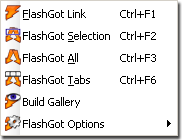
FlashGot offers also a Build Gallery functionality which helps to synthetize full media galleries in one page, from serial contents originally scattered on several pages, for easy and fast "download all".

Motivation
Since I switched from MS Internet Explorer to a serious browser, I've had only one regret: I've been missing the ability to handle "massive downloads" through a multithreaded, file splitting download manager.
In IE there was a "Download all with MyNice DownloadManager" menu item, which delivered every link on a web page to the download manager, ready to be choosen and downloaded in batch.
There was nothing like this on Mozilla/Firefox, so I decided to build my solution with my own hands... and it works pretty well (at least for me).
Now, after many releases, FlashGot is probably the most advanced form of browser integration for download managers, often better than the native one provided for IE, featuring:
- a "FlashGot selection" command to selectively download items you highlight on the page (even pure textual links!)
- a Build Gallery command, helping you to auto-generate complete media gallery from partial ones to download at once all the contents in a serie.
- Convenient shortcuts and hooks for single downloads, like Alt+Click on a link and automatic interception of unknown content types, giving you the chance to override the default download manager when it is about to start.
- (more in the features page)
